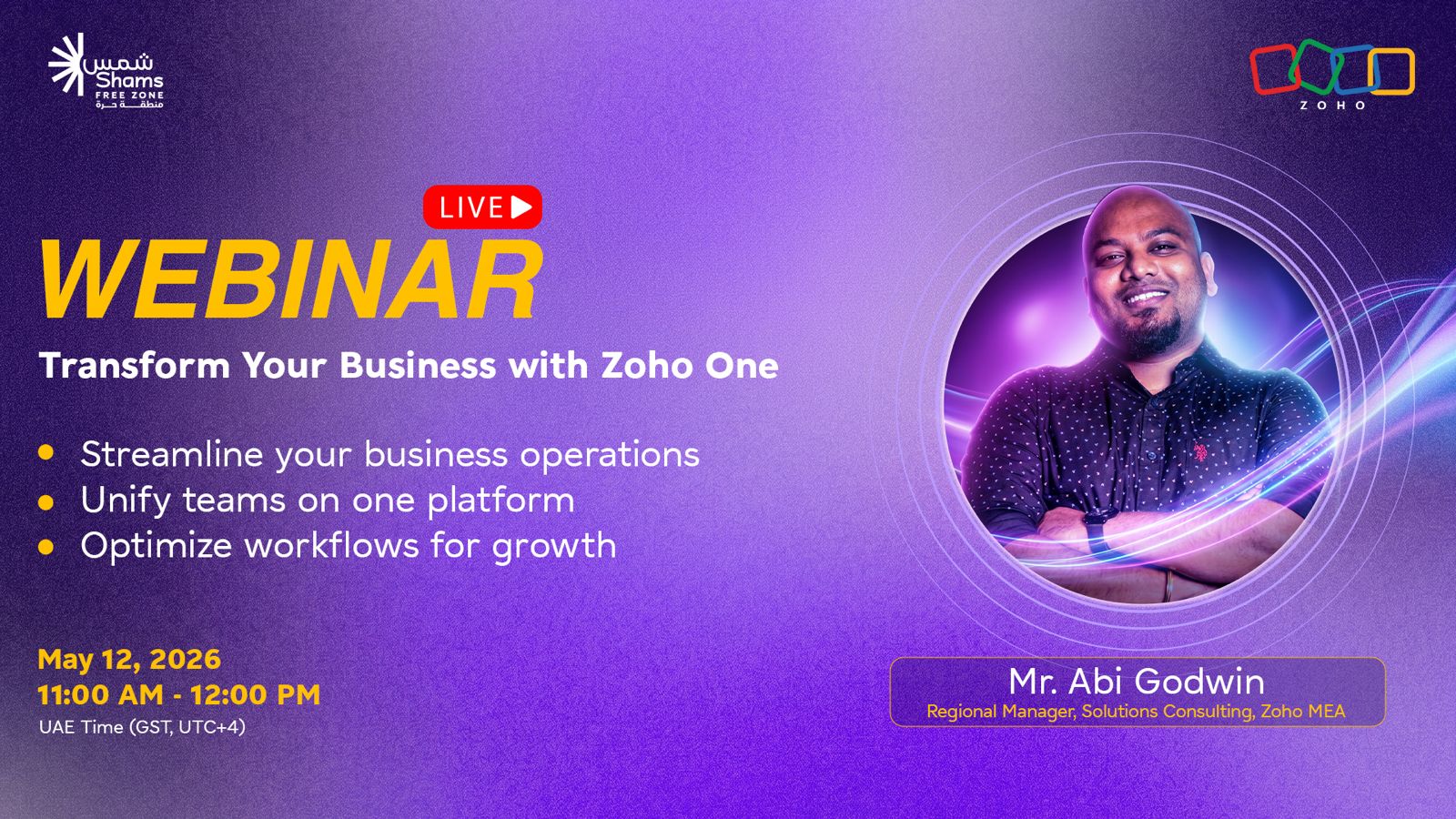
Zoho One brings business tools into one platform, businesses can manage CRM, finance, HR, marketing, customer service, analytics, projects, communication, and more from a unified system.
It helps businesses simplify and scale operations, Zoho One reduces the need for multiple vendors, separate logins, and disconnected tools, making daily operations easier to manage.
Shams Free Zone clients get added value, eligible clients can access USD 1,000 wallet credits and USD 4,000 worth of expert training to support their digital transformation journey.
0:06
Introduction to the Shams Free Zone and Zoho session on transforming business operations.
0:13
Overview of how Zoho One helps simplify operations, improve collaboration, and support sustainable growth.
0:51
Introduction of Abi Godwin, Regional Manager at Zoho MENA.
2:30
Zoho One is introduced as an operating system for the entire business.
2:36
Background on Zoho’s history, global presence, product ecosystem, and privacy-first approach.
5:27
Explanation of Zoho One as a single platform with 45+ unified applications.
7:02
Zoho One covers sales, marketing, finance, HR, support, collaboration, analytics, legal, and business processes.
7:52
How Zoho CRM helps businesses manage leads, customers, pipelines, and customer relationships.
8:54
Bigin is introduced as a simpler CRM option for pipeline and deal management.
9:29
How businesses can manage customer appointments, meetings, and bookings online.
10:08
Using forms to collect customer details, questionnaires, and integrate responses with CRM.
10:47
How chatbots and visitor analytics help businesses engage website visitors.
11:55
Zoho Desk helps businesses manage support tickets, departments, SLAs, and customer responses.
13:35
Overview of Zoho People, Directory, Vault, Notebook, and Calendar for HR and internal management.
15:49
Zoho Books supports accounting, invoices, payables, receivables, cash flow, inventory, and payments.
17:44
Zoho Expense, Billing, Invoice, and Checkout help businesses manage reimbursements, subscriptions, invoicing, and payments.
19:28
Zoho Marketing Automation, Campaigns, and Survey help businesses run campaigns, track engagement, and collect feedback.
22:02
Zoho Social, Thrive, Sites, and Recruit support social posting, loyalty programs, website building, and hiring.
24:04
Zoho Analytics, DataPrep, and PageSense help businesses clean data, track performance, and create reports.
26:22
Zoho Creator allows businesses to build custom apps, portals, workflows, and integrations.
27:50
Zoho WorkDrive helps teams store, organize, share, and manage files securely.
29:07
Zoho Connect, Show, Notebook, Vani, Cliq, Mail, and TeamInbox help teams communicate and collaborate.
31:48
Zoho Meeting and Zoho Backstage support virtual meetings, webinars, event pages, tickets, and registrations.
33:20
Zoho Sign, Projects, Sprints, Learn, Survey, and Connect support project management, e-signatures, training, and feedback.
35:40
Zoho One connects applications through a unified interface, navigation, calendar, dashboard, configuration, and integrations.
38:56
Users can access Zoho One and individual Zoho apps through mobile applications.
39:29
Zoho invites businesses to begin their digital transformation journey with Zoho One.
39:48
Zoho answers questions about pricing, offers, and benefits for Shams Free Zone customers.
40:30
Eligible Shams Free Zone clients can access USD 1,000 wallet credits and USD 4,000 worth of expert training.
41:01
Discussion on Zoho One pricing and whether businesses can subscribe to individual apps such as Zoho Books.
42:07
Zoho confirms in-person training in Dubai and a 30-day free trial for Zoho One.
43:27
Zoho explains that separate product sessions can be arranged for detailed walkthroughs.
47:45
Explanation of how eligible Shams Free Zone clients can claim Zoho credits using their license details.
48:36
Zoho confirms that both one-on-one and online training options are available.
48:47
Final thanks and wrap-up of the Zoho One webinar.
Good morning everyone, and a warm welcome to today’s webinar.
At Shams Free Zone, we’re pleased to partner with Zoho for today’s session: Transform Your Business with Zoho One.
In this webinar, we’ll explore how businesses can simplify operations, improve collaboration, and drive sustainable growth through an all-in-one business platform.
Before we begin, just a quick note for all participants: you’ll be on mute throughout the session. However, we highly encourage you to share your questions in the Q&A and chat section during the webinar, and we’ll address them toward the end of the session.
If you’d like to connect further with the Zoho team after the webinar, we’ll also be happy to share the contact details.
Now, it’s my pleasure to introduce our speaker, Mr. Abi Godwin.
Mr. Abi Godwin is a Regional Manager at Zoho MENA with over seven years of experience helping organizations across the Middle East and Africa drive digital transformation through technology-led solutions.
With deep expertise in the Zoho ecosystem, he has worked with government entities and enterprises to streamline operations and enhance customer experiences. Known for his practical and engaging approach, Abi brings valuable real-world insights into automation, CRM strategy, and building efficient business systems.
We’re excited to have you with us today. Please join me in welcoming Mr. Abi Godwin.
Thank you. Thank you so much. Thank you, and thank you to the Shams Free Zone team for giving us this wonderful opportunity to present our solution to your customers and partners. Thank you so much to everyone for joining this session.
I’m going to share my screen and take you through who Zoho is, the applications we have, and what is included in Zoho One. At the end, as mentioned, we’ll have a Q&A session, so you can keep your questions ready and ask them then.
Please confirm whether you can see my screen.
Yes, we can see your screen.
Zoho One is the operating system for your entire business.
To start with, I’ll talk about who we are as Zoho. Zoho Corporation was established in 1996. We have multiple divisions, including ManageEngine, which is our enterprise IT management solution, along with Zoho, TrainerCentral, Qntrl, Vikra, and others.
Zoho is the parent company, and we have all these divisions under it.
Zoho is a private company with a public vision. One of our biggest priorities is privacy. Your privacy is our priority, and we are committed to continuous product development and innovation.
Most of this happens in our India office in Chennai, which is our headquarters. We are dedicated to our customers, communities, and employees.
Zoho has been in the market for almost 30 years. We have a presence in more than 150 countries, have built over 60 applications, serve around 150 million users across the globe, and have around 90,000 employees worldwide.
Zoho is a connected ecosystem.
For the Middle East and Africa, Dubai is our head office. We also have offices across East Africa, West Africa, North Africa, South Africa, Riyadh, Qatar, and the UAE.
We also have data centers for customers who want to host their data within the UAE. We recently launched data centers in Dubai and Abu Dhabi. We also have data centers in Riyadh and Jeddah. Currently, data can also be hosted in US data centers, but if you want your data hosted within the UAE, we have a solution for that.
This is our worldwide presence, and this is how our product portfolio has grown. We started with CRM and built our solutions one by one. Over almost 30 years, we have done a lot of R&D, multiple changes, updates, upgrades, and new applications. Today, we have more than 60 applications.
Now, how do we help businesses with digital transformation?
We provide one unified suite to run your entire business. This unified suite is called Zoho One, the operating system for businesses.
Zoho One is an end-to-end solution. While Zoho has over 60 applications overall, the Zoho One bundle gives you access to more than 45 unified apps. It also gives you a single admin panel with advanced user controls.
You don’t need to log in to multiple tabs or switch between different platforms. From one unified window, you can access all the applications.
For example, you don’t need multiple vendors because all these apps are built into one platform. You don’t need to worry about different licenses, different expiry dates, or logging into separate applications every morning. Everything works with one login.
Within Zoho One, there are applications for sales, marketing, finance and operations, human resources, support, email and collaboration, security and IT management, productivity, BI and analytics, legal, and business processes.
If you are a startup and are looking for one solution to run your business, Zoho One can help. You don’t need to worry about separate tools for email, CRM, campaigns, HR, and other operations because everything is in one platform.
The first area we will look at is optimizing your business and getting the best out of it.
To do that, you need to attract, acquire, and retain customers. For this, you need a platform where you can keep all your customers in one place.
That is why we have Zoho CRM.
Within CRM, you can manage all your customers, collect leads from various sources, and manage your pipeline properly. You can also track what has happened to your leads, send emails, and track those emails within the platform.
Zoho CRM gives you a complete 360-degree view of your customer, from getting the lead to connecting, engaging, scheduling activities, and managing the relationship.
If you feel CRM is too big for your team, we also have Bigin, which is a smaller version of CRM. It helps you manage customers directly through pipeline management. It doesn’t include lead management in the same way as CRM, but you can manage pipelines and track how many deals each person is working on.
We also have Zoho Bookings.
If you are a salon, clinic, consulting business, or any organization that needs customers to book appointments, Zoho Bookings helps you manage that. You can create a link, share it with customers, or add it to your website so customers can book appointments or meetings with you.
Then we have Zoho Forms.
If you want to collect customer data or create questionnaires, Zoho Forms lets you build forms using a drag-and-drop interface. You can create the form, share it through a link, and customers can fill it out without needing a Zoho account. The data can also be integrated with CRM for future reference.
We also have SalesIQ.
If you are a startup and want customers to engage with you directly through your website, SalesIQ lets you add a chatbot. Visitors can click the chat popup and reach out to you directly.
SalesIQ also provides analytics, such as how many visitors came to your website and which countries they came from. This helps you attract, acquire, and retain customers.
You can also track customers you have not contacted for two or three months and create journeys, blueprints, and automations to retain them.
The next area is customer service.
Customer service is one of the most important parts of any business. Without good customer service, it becomes difficult to retain customers.
For this, we have Zoho Desk.
Zoho Desk helps you manage customer service through tickets. For example, if you have email addresses like sales@, support@, or operations@, you can create multiple departments inside Zoho Desk.
When customers send emails, messages through chat, or messages through social media, tickets can be automatically created and routed to the right department or agent based on the email address, keywords, or channel.
You can also create SLAs, so if a customer is not responded to within a set time, escalations are triggered. Agents, managers, and reporting managers get visibility into how quickly the team is responding to customers.
The next area is employee experience.
For employees, one of the core tools is Zoho People, which is our HR application. It allows HR teams to manage attendance, integrate with biometrics, or use location and IP restrictions for check-in and check-out.
Employees can apply for leave, request salary certificates, and manage HR-related requests digitally. Zoho People covers the full HR journey, from onboarding to exit management.
We also have Zoho Directory, where you can manage how team members access the platform, track login activity, and set restrictions.
Zoho Vault helps store confidential information such as passwords.
Zoho Notebook helps teams take and manage notes.
Zoho Calendar syncs with CRM and Bookings, so everything appears in one place. Calendars can also be shared among team members so availability and meetings can be viewed easily.
The next area is finance.
Finance is the backbone of any business. For that, Zoho offers several finance applications.
The core accounting tool is Zoho Books. Zoho Books helps manage day-to-day accounting, including payables, receivables, cash flow statements, invoices, purchases, and more.
You don’t need to be an accountant to use Zoho Books. If you are new to business and want to manage daily accounts, Zoho Books is self-explanatory and easy to use.
You can create customers, generate invoices, track whether payments are made or overdue, and receive notifications based on due dates.
Zoho Books also includes purchase modules and item modules. If you are a trading company, you can list goods. If you are service-based, you can manage services. Items can be classified as goods or services, and you can also track inventory, accounting stock, and physical stock.
Zoho Expense helps manage reimbursements.
For example, if your team visits client sites and claims petrol or travel expenses, they can take pictures of bills, and the system scans and fills in the data automatically. The expense can then go through multiple approval levels and finally to accounts for reimbursement.
Zoho Billing is useful for businesses that offer monthly or yearly subscriptions. It helps track subscription billing.
Zoho Invoice is available if you only need invoicing and do not want to use the full accounting system. You can create invoices, share them with customers, and collect payments.
Zoho also integrates with payment gateways such as PayTabs and Stripe, so payments can be collected online.
Zoho Checkout helps you create instant payment links that can be shared with customers.
The next area is growth.
To set your company up for success, you need to keep your customers informed. This is handled through Zoho’s marketing tools.
Zoho Marketing Automation lets you manage marketing activities in one place, including campaigns, lead collection, and ROI tracking.
Zoho Campaigns helps you send email campaigns to your customers. For example, if you are launching a new product and have a database of 500 or 1,000 customers, you don’t need to send emails one by one.
You can upload contacts or sync them from CRM, create or edit an email template, and send a campaign with one click.
You can then track how many people received the campaign, opened the email, clicked the link, or did not open it. You can also set automations, such as sending another email if the first email was not opened.
Zoho Survey helps collect feedback. For example, after a customer visits your office or after a deal is closed, you can automatically send a survey link to understand how good the service or product experience was.
Zoho Social helps manage your online presence.
If you want to create a post and publish it across Facebook, Instagram, X, Google Business Profile, YouTube, TikTok, and other platforms, you can do it from one place.
Zoho Thrive helps manage loyalty programs and points.
Zoho Sites helps you build your own website using drag-and-drop tools, even if you are not a developer.
Zoho Recruit helps manage the recruitment journey, from job posting to onboarding and offer letters.
For insights, Zoho Analytics helps you see data across all applications in one place.
While every Zoho app has its own reports and analytics, Zoho Analytics gives deeper insights, dashboards, charts, funnels, and AI-supported forecasting. It helps you create a holistic report for management.
Zoho DataPrep helps clean messy data. It identifies duplicates, highlights issues, and helps prepare clean data before uploading it into CRM or other systems.
Zoho PageSense helps track website performance, visitor behavior, and customer journeys on your website or e-commerce platform.
The next area is creation.
Zoho Creator is a low-code and no-code platform. If Zoho’s ready-made applications do not cover your specific requirement, you can build your own app, mobile app, customer portal, or vendor portal.
You can white-label the app, publish it on the App Store or Play Store, create workflows, and integrate it with other systems such as SAP, Oracle, or your own ERP. Zoho Creator uses drag-and-drop features, but some coding may be required for more advanced customization.
Zoho WorkDrive helps you organize files. With Zoho One, you get 500 GB of storage per user license. You can store, organize, manage, share, and restrict access to files internally and externally.
You can also use Zoho Writer, which is similar to a word processor, and Zoho Sheet, which is similar to Excel. Files can be saved and managed within WorkDrive.
Zoho Connect gives everyone a voice inside the organization. It works like an internal social media platform where team members can post ideas, share updates, comment, like, and discuss.
At Zoho, for example, we use Connect for town halls and internal communication.
Zoho Show is the presentation tool I am currently using for this webinar.
Zoho Notebook helps with note-taking.
Zoho Vani helps create content such as flowcharts and collaborative visuals.
For internal communication, Zoho Cliq can be used instead of WhatsApp for company discussions. You can make calls, video meetings, group chats, and group calls.
Zoho Mail helps manage emails and is integrated with CRM and other Zoho applications.
Zoho TeamInbox lets you create shared inboxes for teams such as marketing.
Zoho Meeting helps schedule virtual meetings and webinars, similar to Zoom.
Zoho Backstage is useful for event management. It helps create event pages, manage tickets such as silver, gold, or platinum, show agendas and speaker information, collect attendee registrations, and gather information such as merchandise sizes.
For engagement and project management, Zoho Sign allows you to collect e-signatures on contracts and documents.
Zoho Projects follows the waterfall methodology, while Zoho Sprints follows agile methodology. You can create projects, milestones, tasks, subtasks, task lists, assign agents or teams, and track timesheets.
Once a project is completed, you can send a document through Zoho Sign for customer approval.
Zoho Learn helps with employee training. You can create online courses, quizzes, and certificates to track learning completion.
Zoho Survey and Zoho Connect can also be used to collect internal feedback.
All Zoho apps are built on the same technology stack. They share a unified user interface, unified navigation, unified calendar, unified dashboard, unified configuration, and third-party integrations.
You can switch between applications from one interface, manage calendars across apps, and view dashboards across sales, finance, CRM, books, and other applications.
Zoho One includes more than 50 pre-built widgets for personalization. Configuration and customization can also be managed from one place.
Zoho also supports third-party integrations with tools such as Microsoft Teams, Zoom, and Microsoft Office.
Zoho One provides a unified customer portal where you can manage portals for CRM, Books, Projects, and more.
The integration panel lets you view active integrations, available integrations, and recommended integrations from one place.
You can access Zoho One through one powerful mobile app. Individual Zoho applications also have their own mobile apps for iOS and Android.
We would love to help you with your digital transformation journey.
Start your Zoho One journey today.
Thank you all. Thank you so much for patiently listening to the presentation.
Now, we’ll move to questions.
The first question is about prices and offers that Zoho is giving right now.
For Shams Free Zone customers, Zoho provides USD 1,000 wallet credits and USD 4,000 worth of expert training for customers who have a Shams Free Zone license.
Another question is: if I don’t need all these sub-applications, will I get lower prices?
Zoho One is priced at AED 135 per employee per month, billed annually. For a startup or new business, Zoho One is usually recommended because it gives access to many applications in one platform.
If you want only an individual app, such as Zoho Books, you can purchase that separately. For example, Zoho Books Professional Edition has its own pricing and user limits. So depending on which application you choose, the price can go down or up.
Can I get only Zoho Books?
Yes, you can get Zoho Books alone.
Do you provide in-person training in Dubai?
Yes, Zoho provides in-person training in Dubai. The office is in Media City and is open from 9 AM to 6 PM. It is recommended to give the team a heads-up before visiting so that an expert is available to help.
Do you have a free version to try?
Yes, Zoho One has a 30-day free trial. Up to 10 users can sign up. It is recommended to use a Gmail account for the trial instead of your official business email, so you can test freely and then start fresh later with your official account.
Who should be contacted for training?
You can contact the Zoho MENA alliances team or reach out to Abi Godwin directly.
Can you show the product?
Since the time is limited, Zoho can arrange a separate session where each product can be shown in detail and explained based on your business needs.
Can you repeat Thrive and Sites?
Zoho Thrive is a loyalty program platform. It can be integrated with your website and helps manage loyalty points.
Zoho Sites helps you build your own website using drag-and-drop features. You can configure your own domain and create a website yourself.
Is there any charge for training?
No, there is no charge for the training included in the offer.
For a startup with three people, what is the recommendation?
Zoho One is recommended for startups because it gives access to all major applications in one place without needing multiple vendors.
What is the procedure for claiming the free Zoho credits and getting the Zoho subscription?
You can contact the Zoho MENA alliances team with your details and your Shams Free Zone license. The Zoho team will evaluate your details and add the credits to your account. You should be a new Zoho customer to claim the credits.
Is there one-on-one training or online training?
Both one-on-one training and online training are available.
Thank you so much, Abi, for the insightful session and for sharing your expertise with us today. Thank you to everyone for joining, and we appreciate your time and participation.
We trust today’s webinar has provided you with practical insights and ideas to help drive greater efficiency and growth in your business.
Have a wonderful day.
Zoho One is an all-in-one business platform that gives businesses access to multiple tools for CRM, finance, HR, marketing, customer service, analytics, projects, communication, and more.
Zoho One brings different business applications into one unified platform, helping teams avoid multiple vendors, separate logins, and disconnected systems.
Zoho One supports sales, marketing, finance, HR, customer service, email, collaboration, analytics, project management, file storage, automation, and business process management.
Yes, Zoho One is suitable for startups and small businesses because it provides essential tools in one place, helping them manage operations, customers, finances, and growth more efficiently.
Eligible Shams Free Zone clients can access USD 1,000 wallet credits and USD 4,000 worth of expert training to support their digital transformation journey.
Enquire Now
Enquire Now
Apply Now
يرجى ملء النموذج لبدء محادثة على واتساب.
يرجى ملء النموذج لبدء المكالمة.
Please fill out the form to start the call.
Please fill out the form to start a WhatsApp chat.
Enquire Now